Your competitors are using AI to check their Amazon numbers — are you?
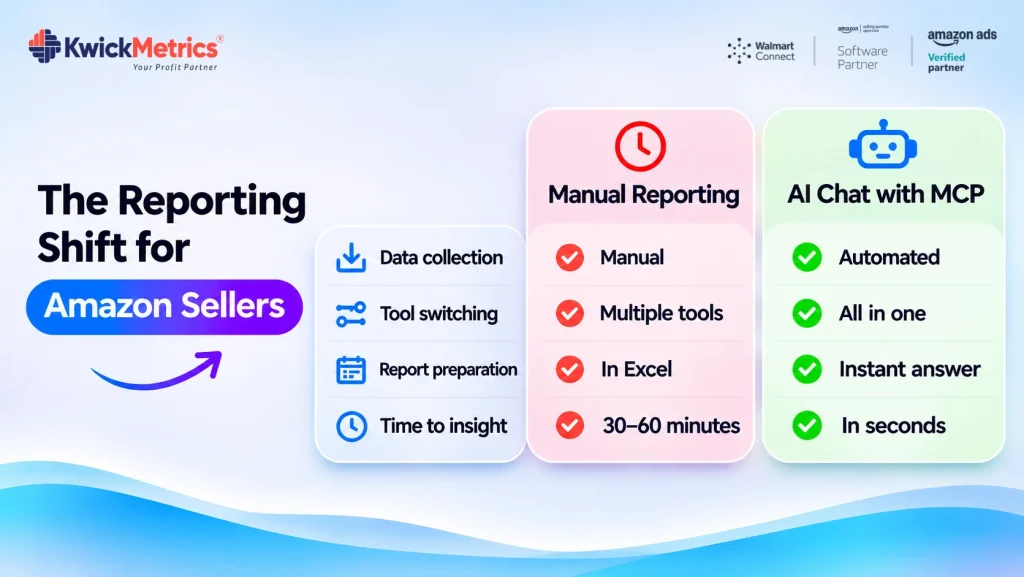
Table of Contents
Every Monday morning looks the same. You open Seller Central, pull the business reports, switch to the advertising console, export campaign data, and paste it into a spreadsheet. By the time the numbers are in one place, most of your morning is gone.
The ACOS (Advertising Cost of Sale) spike that started Thursday? It’s been running unchecked for days because your next report wasn’t until today.
That workflow hasn’t changed in years. But the tools around it have. Sellers and agencies running AI against their Amazon data skip the export-and-pivot step entirely. They type a question — “which campaigns spent more than $500 this week with ACOS above 40%?” — and get an answer in seconds from their live account data.
The gap between sellers using amazon seller analytics tools with AI and those still running manual reports is getting wider every quarter.
AI-powered amazon seller analytics tools let you ask questions about your sales, advertising, and profitability data in plain language instead of pulling reports from multiple dashboards. The sellers gaining an edge aren’t working with better data — they’re reaching answers faster because AI connects directly to their metrics. The shift from manual reporting to AI-assisted analytics is already underway, and the cost of staying manual shows up in missed insights and delayed decisions.
Why Amazon sellers still check numbers manually
Most sellers check numbers manually because their data lives in at least 3 separate places — Seller Central business reports, the advertising console, and whatever spreadsheet tracks COGS and profit margins. No single Amazon analytics dashboard connects advertising spend to real profit, so sellers build their own reporting layer every week.
The advertising console shows impressions, clicks, and ACOS — but not profit. Seller Central shows orders and revenue — but not ad spend. Neither shows COGS, so actual margin stays invisible until someone does the math. Amazon introduced AI-powered tools at Accelerate 2026, but they work inside Seller Central’s own walls, not across your full data picture.
For agencies, multiply that fragmentation by every client account. A 20-account agency running weekly performance reviews touches 60+ separate data views before a single insight emerges. The problem isn’t missing data. It’s that assembling it takes longer than acting on it.
What manual Amazon reporting actually costs you
Manual reporting costs you in two ways: the hours you spend assembling numbers, and the decisions you miss while those numbers sit unfinished.
Every week, a seller managing even a single account pulls Seller Central business reports, reviews the advertising console, reconciles everything in a spreadsheet, and checks inventory levels. That routine eats most of a morning — time spent producing no revenue and no new insight.
The bigger cost is what you miss. An ACOS spike that starts on Thursday runs unchecked until Monday’s report. A campaign where spend climbs but conversions don’t gets days of wasted budget before anyone notices. An inventory velocity change that signals a stockout goes undetected until it’s too late to reorder. These aren’t hypothetical — they’re the patterns that slip through when your reporting cadence is weekly and your market moves daily.
For agencies managing multiple accounts, every one of those blind spots multiplies across every client. The hours spent assembling dashboards are hours not spent optimizing campaigns. And the longer the gap between data appearing and someone reviewing it, the more money quietly leaks out of every account.
How AI changes the way you analyze Amazon data
AI analytics tools remove the assembly step by connecting directly to your Amazon data and answering questions in natural language — no exports, no pivot tables, no dashboards to click through. The connection happens through a standard called MCP (Model Context Protocol), which lets compatible AI applications read your data from external tools with your permission.
Ask questions instead of building reports
Instead of opening 3 tabs and matching columns, you type: “Which campaigns had ACOS above 35% last week?” or “What’s my TACOS (Total Advertising Cost of Sale) trend over the past 30 days?” The AI pulls the answer from your connected data in seconds.
KwickMetrics connects to MCP-compatible AI clients, so you can query your Amazon advertising and business performance data through natural language. Ask “why did my ACOS increase this week?” and get an answer drawn from your actual campaign numbers — not a generic suggestion. You still make every decision; the AI gets you to the right data faster.
Spot problems before they cost you money
AI flags patterns you’d miss in a weekly review — a sudden conversion rate drop, a campaign where spend climbed but sales didn’t, or an inventory velocity change that signals a stockout in days. You find these the moment you ask, not when the next scheduled report lands.

Reduce repetitive analysis work
Questions you ask every week — top campaigns by spend, declining SKUs, profitability by product — become a conversation instead of a lengthy spreadsheet session. The data doesn’t change. The time to reach it does.
Running AI analytics across multiple accounts
For agencies, the math changes dramatically. A single analyst managing 20 client accounts can run the same natural language query across every account in minutes instead of logging into 20 separate Seller Central views and rebuilding the same report 20 times.
The reporting hours scale linearly with accounts — but the value of those hours doesn’t. Every additional account means more time assembling dashboards and less time on the work clients actually pay for: strategy, optimization, and growth. KwickMetrics supports unlimited accounts on every plan, so agencies don’t pay per account to connect client data. The same AI-assisted workflow scales from 5 accounts to 50 without changing the cost structure.
The insights AI surfaces don’t automatically execute changes. You still review, decide, and act. The difference is that reviews take minutes instead of hours, and you catch problems on the day they start.
With KwickMetrics MCP, agencies can query supported capabilities across client accounts through any MCP-compatible AI client — reducing the need to navigate multiple reports for routine performance analysis. That frees analyst time for the work clients actually pay for: strategy, optimization, and growth.
Where to start
Pick the 3 metrics you check most often. ACOS, net profit per unit, and conversion rate are common starting points. Frame them as questions: “What was my ACOS by campaign last week?” or “Which products had declining conversion rates this month?”
Start with questions you already know the answer to. That lets you validate the AI’s output against your own data and build trust in the results. Once the accuracy checks out, move to the analysis you don’t have time to do manually — cross-account comparisons, trend detection, the anomaly spotting that falls through the cracks every week because the weekly report already eats your entire morning.
Whether you manage 1 account or 30, the data is already there. AI just makes it faster to ask the right questions.
Bring every client account under one login — no per-account fees.
Get Your Questions Answered (FAQ)
No. AI analytics tools connect to your existing Amazon data and help you query it faster. You still need Seller Central for account management, listing changes, and case logs. AI handles the analysis side — finding patterns, surfacing anomalies, answering performance questions — so you spend less time navigating dashboards and more time acting on what the data shows.
MCP (Model Context Protocol) is an open standard that lets compatible AI applications connect to external tools and data sources. When your analytics platform supports MCP, AI clients can read your Amazon metrics — advertising, sales, profitability — and answer questions about them. The AI accesses only what the platform exposes, with your permission.
No. AI analytics tools that connect through MCP are read-only for data queries. They surface insights and help you spot trends, but they don’t execute changes to campaigns, listings, or account settings. You review the findings and decide what to act on. AI finds the problem faster; you stay in control of every action.
AI insights are only as accurate as the data they pull from. Current, complete, and contextualized metrics produce reliable answers. That’s why the quality of your analytics platform matters more than the AI model. Always validate AI-generated findings against your source data, especially for high-stakes decisions like pausing campaigns or reordering inventory.


Nilanth is a contributor at KwickMetrics and a Full Stack Developer with 7+ years of experience building scalable web applications using Laravel, ReactJS, NextJS, and Headless WordPress. He plays a key role in enhancing KwickMetrics by developing efficient, high-performance solutions that help sellers and agencies gain better insights, streamline operations, and drive growth.