How to Set Up Dayparting on Amazon Using KwickMetrics (Step-by-Step Guide)
Table of Contents
- Setting Up Dayparting on Amazon with KwickMetrics
- What is Dayparting in KwickMetrics?
- Where to Find the Dayparting Tool in KwickMetrics?
- How to Set Up Dayparting in KwickMetrics (Step-by-Step)
- Use the Heatmap to Identify Peak Hours
- Configure Your Bid & Budget Multipliers
- Set a Schedule
- Adjust On the Fly
- Track Your Dayparting Performance
- Important Notes to Keep in Mind
- Use Cases: When Should You Use Dayparting?
- Final Thoughts: Automate, Optimize, and Win
Setting Up Dayparting on Amazon with KwickMetrics
Looking to boost your Amazon ad performance by running campaigns only during peak hours?
Dayparting is your answer—and KwickMetrics makes it effortless with a powerful, visual, and data-driven dayparting interface.
In this guide, you’ll learn how to use KwickMetrics to implement dayparting for Amazon Sponsored Products and Sponsored Display ads, control your bids and budgets by time slot, and optimize your campaign performance like a pro.
What is Dayparting in KwickMetrics?
Dayparting in KwickMetrics lets you schedule your ad campaign bids, budget and placements to run, enhance and pause on hourly basis during specific hours of the day or days of the week—based on historical performance data.
You don’t just pause or resume campaigns manually. With KwickMetrics:
- You can automatically adjust bids, placements and budget by hour.
- Use a visual heatmap to identify high-performance time slots.
- Apply customized strategies to campaigns and their entities of marketplace, campaign, and ad type.
Where to Find the Dayparting Tool in KwickMetrics?
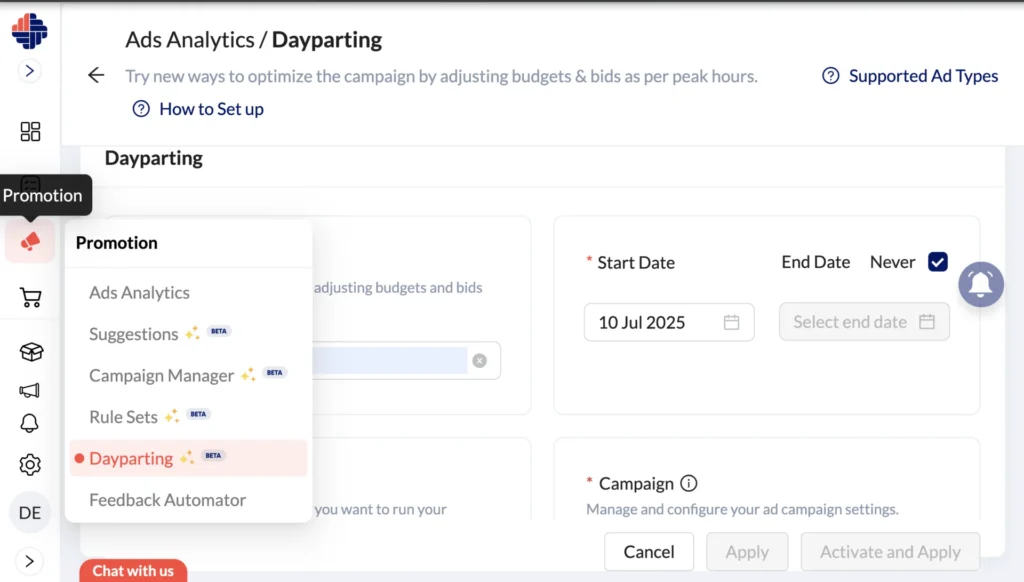
Navigate to:
Side Menu → Promotion → Dayparting
Here, you’ll see a dedicated Dayparting Dashboard, designed to help you:
- Create new dayparting strategies
- Manage active dayparting schedules
- Monitor campaign performance over time
How to Set Up Dayparting in KwickMetrics (Step-by-Step)
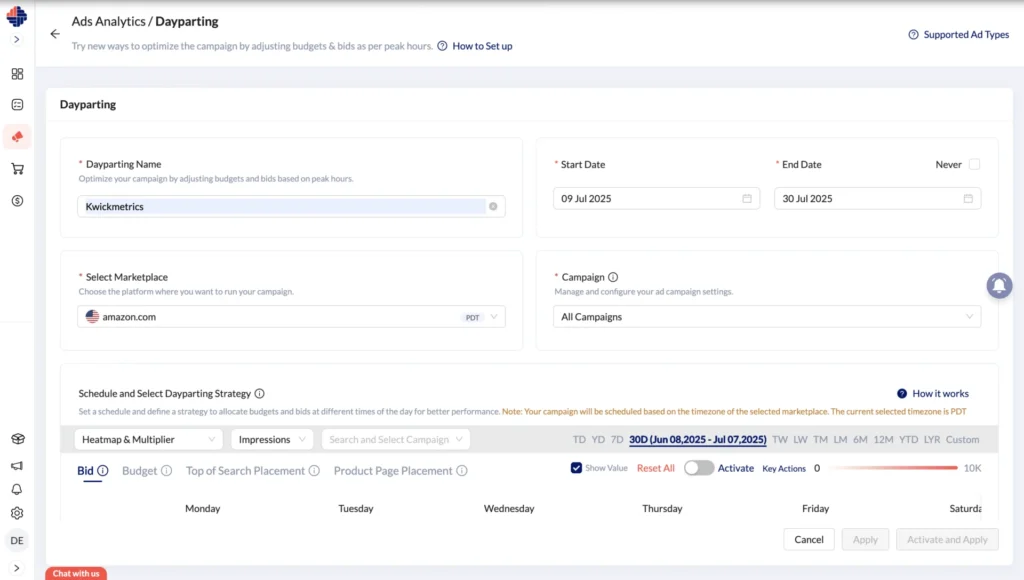
- Create a New Dayparting Strategy
- Click on “New Dayparting”
- Give your dayparting a name for easy tracking.
- Select the time duration for when dayparting ads should run.
- Choose Your Marketplace and Platform
- Select the appropriate marketplace (e.g., US, UK, IN).
- Time zones vary by marketplace, and your schedule will follow the selected marketplace (PDT, IST, etc.).
- Select Campaigns
- Pick one or more campaigns to apply the dayparting.
(The campaign shown will be the Sponsored Products or Sponsored Display only)
- You can create one dayparting for all campaigns within a single marketplace, and repeat for other marketplaces as needed.
Use the Heatmap to Identify Peak Hours
KwickMetrics offers a powerful heatmap view, where you can:
- Visualize ad performance by hour for the specific time: Yesterday, 7 days, Last week, Last month, 6 months, 1 year, or a Custom date range.
- Choose the performance metric you want to optimize for: Impressions, Clicks, ACoS, CPC, ROAS, Ads sales, and more.
- Hover over each time slot to view exact data points.
Use Case:
Want more impressions? Use “Impressions” view to find peak awareness times.
Chasing conversions? Switch to “Clicks” or “Sales” and find your buyer hotspots.
Configure Your Bid & Budget Multipliers
Once you’ve selected your hours:
Use the two-column grid to assign:
- Bid Multipliers
- Budget Multipliers
- Top of search & Product page Placements
- Formula:
-
Final Value = Base Value × Multiplier
Example: If your base budget is $100 and you assign a 10x multiplier from 4–5 PM → Your budget becomes $1000 for that hour.
You can set multipliers from 1x to 999x, or 0x to completely pause during that slot.
✅ Tip:
If you don’t want your ad to appear in Top of Search or Product Page placements, set the multiplier to 0x for that specific placement.
Set a Schedule
- Define your dayparting strategies for each day of the week.
- You can apply different strategies across days of the week based on performance patterns.
- Don’t have to worry about your bids or budgets staying inflated after a scheduled boost. Once your dayparting schedule ends, all values—bids, budgets, and placements—automatically revert to their original (base) settings.
- No manual reset needed.
- No risk of overspending after peak hours.
- Just reliable automation that keeps your campaigns under control.
Adjust On the Fly
If you notice that budget is running low during a live campaign:
- You can adjust multipliers midway.
- The changes will be reflected from the next time slot onward.
Example:
You update the 6 AM slot before 6 AM → Applies immediately.
You update it after 6 AM → Applies next Monday at 6 AM.
One of the biggest advantages of using KwickMetrics for dayparting is the speed. Unlike manual changes in Seller Central, which can be time-consuming and error-prone, our system applies updates to your bids, budgets, and placements in under a minute.
Track Your Dayparting Performance
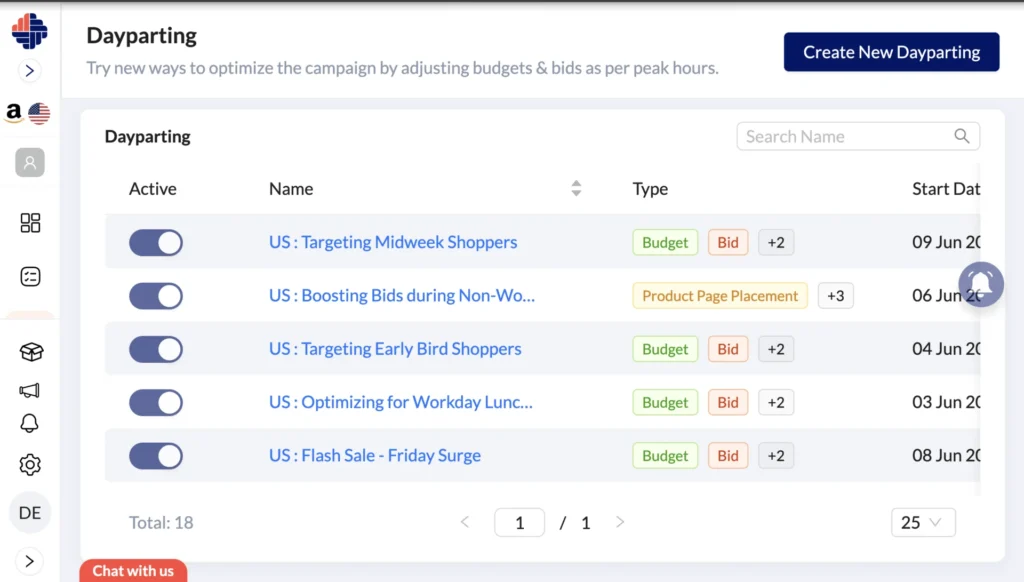
The Dayparting Index page shows:
- All active daypartings
- Type of ad strategy like bid, budget, placement
- Scheduled duration per dayparting
- In reports, you will get the before campaign and after dayparting of campaign with performance metrics analytics like Ad sales, ACOS & ROAS.
This gives you full transparency and control.
Important Notes to Keep in Mind
- Default: All multipliers start at 1x (i.e., base bids and budgets).
- Amazon Budget & Bids Limits: If your final budget exceeds Amazon’s limit (e.g., $1,000,000 for the US), it won’t be updated.
- Unlinking Campaigns: Removing a campaign from dayparting or disabling a dayparting will not revert to its base values.
- One Schedule Per Campaign: You cannot assign multiple dayparting schedules to the same campaign for the same date range.
- Only enabled targets and keywords are linked to Day Parting when you create or update dayparting.
Use Cases: When Should You Use Dayparting?
- Reduce ACoS by avoiding low-converting hours.
- Maximize reach during your best performance windows.
- Fine-tune visibility across global marketplaces (US mornings vs. India nights).
- Tailor campaigns for high-intent shopping events (e.g., payday, holidays).
Final Thoughts: Automate, Optimize, and Win
Manual dayparting is difficult to scale. With KwickMetrics, you can:
- Visualize peak hours
- Automate bid and budget changes
- Reduce waste and increase returns
- Lightning-Fast Ad Adjustments with KwickMetrics
- Set It and Forget It: Automatic Reversion to Base Settings
If you’re serious about scaling your Amazon business, dayparting is no longer optional—it’s essential.
Unlock Smarter Dayparting
Start your free trial of KwickMetrics today and explore smart, data-driven dayparting tailored to your campaigns and marketplaces.
Nilanth is a contributor at KwickMetrics and a Full Stack Developer with 7+ years of experience building scalable web applications using Laravel, ReactJS, NextJS, and Headless WordPress. He plays a key role in enhancing KwickMetrics by developing efficient, high-performance solutions that help sellers and agencies gain better insights, streamline operations, and drive growth.