Amazon Product Listing Images: Best Practices to Boost Clicks & Sales

Table of Contents
Amazon product images are sales drivers, not just visuals. The main image must follow strict rules, white background for hero images, no text, product fills 85% of the frame. Secondary images like lifestyle shots, infographics, and close-ups build trust, answer buyer questions, and reduce returns. Use clear, high-quality photos (professional or DIY) and adapt them for different marketplaces to boost clicks, conversions, and compliance.
Introduction
You could have the best product in your category — right price, great reviews, solid keywords — and still lose the click to a competitor with better images.
On Amazon, images load before your title renders on mobile. They’re the first thing a shopper sees in search results, and in most categories, they’re the deciding factor between a click and a scroll-past.
The challenge is that Amazon’s image rules are stricter than most sellers realize — and the cost of getting them wrong isn’t just suppression. It’s lost ranking, lower CTR, and returns from buyers who felt misled.
This guide covers everything: Amazon’s exact technical requirements, the image types that actually convert, the mistakes that silently kill listings, and how to audit where your catalogue stands today.
Best Practices for Amazon Product Listing Images
When we talk about “best practices” on Amazon, it’s not just about design or creativity, it starts with strictly following Amazon’s official requirements. Once compliance is in place, sellers can use the right image types, optimize for SEO and AEO, and apply advanced strategies to stand out.
Here are the best practices:
1. Amazon’s Official Image Requirements (Must-Do Compliance Rules)
Amazon enforces strict guidelines to ensure listings are professional and consistent across the marketplace. Not following these rules can result in suppressed or blocked listings.
Technical Specifications
- Images must be between 1600 and 2000+ pixels on their longest side.
- For zoom to work, images should be at least 1600px on the longest side.
- Accepted formats: JPEG (.jpg/.jpeg), TIFF (.tif), PNG (.png), or non-animated GIF (.gif).
- While multiple formats are allowed, JPEG (.jpg/.jpeg) is Amazon’s preferred option for quality and faster loading.
- Images must be clear, sharp, and free of pixelation or jagged edges.
- Recommended aspect ratio: 1:1 square for best display across devices.
- The maximum image file size is 10 MB.
(Source: Technical image file requirements)
Main Image (Hero Image) Rules
Amazon Main Image Rules Every Seller Must Know
- No placeholders or temporary graphics.
- Pure white background (RGB 255, 255, 255).
- Product must fill around 85% of the frame.
- No text, logos, watermarks, or decorative borders.
- Show the entire product without cropping or cut-offs.
- Only include items that come with the purchase — no misleading props.
- Only one unit per image, no duplicate angles in a single shot.
- No star ratings, promotional text.
- No Amazon badges like Best Seller or Amazon’s Choice.
- Multipacks: If you are selling a multipack, the main image must show all units included in the pack together with packaging so buyers can clearly see the quantity.
Amazon Image Requirements — Quick Reference
| Requirement | Specification |
|---|---|
| Minimum pixel size | 1600px on longest side (for zoom) |
| Recommended pixel size | 1600–2000px |
| Accepted formats | JPEG (preferred), TIFF, PNG, GIF (non-animated) |
| Max file size | 10 MB |
| Aspect ratio | 1:1 square recommended |
| Main image background | Pure white — RGB 255, 255, 255 exactly |
| Product frame coverage | ~85% of the image frame |
| Max additional images | 8 secondary images + 1 video slot |
| Filename format | ASIN + file extension (e.g. B01ABC123.jpg) |
2. Types of Images that Build Buyer Confidence
Secondary images help buyers visualize, understand, and trust your product. Amazon allows up to 8 additional images and using them strategically can boost conversions.
- Lifestyle Images – Show the product in use (e.g., a backpack on a model).
- Different Angles – Cover front, back, sides, and top views.
- Close-Ups – Highlight texture, stitching, or materials.
- Infographic Images – Call out dimensions, benefits, or special features.
- Comparison Images – Demonstrate before-and-after or highlight advantages over alternatives.
- Instructional Images – Simplify assembly or usage.
Note:
What You Cannot Include in Secondary Images:
- Star ratings or review quotes
- Warranty or shipping guarantees
- Pricing or discount information
- Amazon badges or trademarks
3. Image Optimization for AEO
Beyond compliance, sellers should optimize images for visibility, discoverability, and clarity.
- File Names –Amazon requires filenames to follow a specific format — your product identifier (ASIN or UPC) followed by the file extension, (e.g. A987654321.jpg.) Dashes and spaces in filenames are not accepted
- First Three Images Count Most – They appear above the fold on most devices.
- Readable Infographics – Keep text minimal and legible since most Amazon shoppers browse on phones.
- Localization – Adjust units (inches vs. cm), plugs, or cultural context for regional markets.
- A/B Testing – Use Manage Your Experiments to test which images drive more clicks and conversions.
Note: For Managing your Experiments, you need to enroll in Amazon Brand Registry.
(Source: Amazon Manage Your Experiments)
4. Beyond the Basics: Next-level Product Image Tips for Amazon Sellers
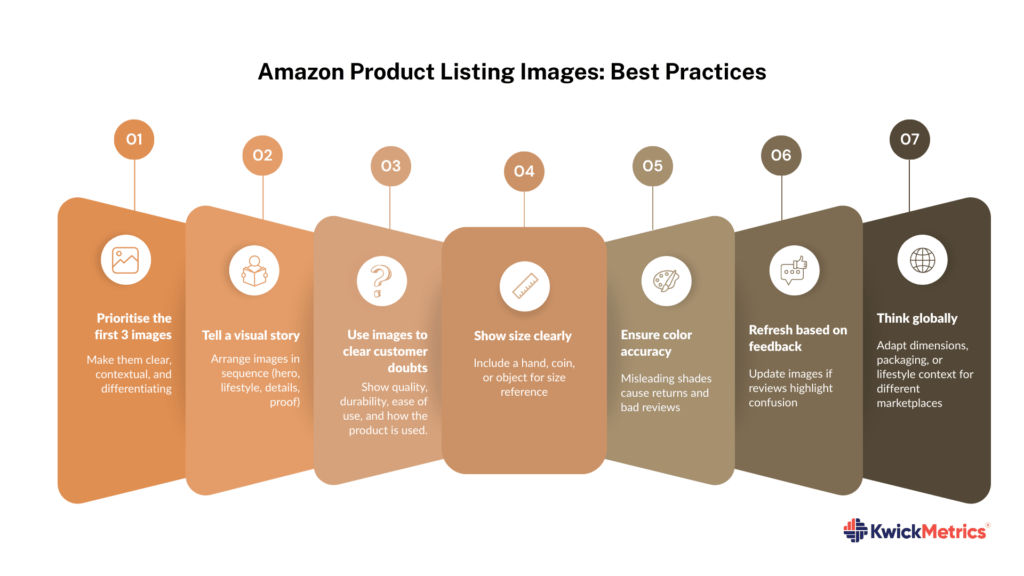
Once the basics are covered, apply these strategies to stand out in competitive categories:
- Prioritize the first 3 images – make them clear, contextual, and differentiating.
- Tell a visual story – arrange images in a logical sequence (hero → lifestyle → details → proof).
- Use images to clear customer doubts – show quality, durability, ease of use, and size.
- Show scale – compare with a hand, coin, or common object.
- Ensure color accuracy – misleading shades cause complaints and returns.
- Refresh images regularly – update visuals based on reviews or product changes.
- Think globally – tailor packaging shots and lifestyle images for different marketplaces.
- Product videos – Use the video slot in your image stack. Product videos improve conversion rates and help communicate your product story (for Brand Registered sellers only).
5. Compliance & Marketplace Variations
While most rules are consistent, a few variations exist:
- Amazon Japan – allows some exceptions for product labeling.
- Amazon India – emphasizes lifestyle images for clarity across diverse audiences.
If you sell globally, always confirm regional Seller Central requirements.
Amazon Listing Image Mistakes Sellers Should Avoid
Even with clear guidelines, many sellers slip up in ways that hurt conversions or lead to compliance issues. Watch out for these frequent errors:
- Blurry or pixelated images → reduces trust instantly.
- Text, logos, or watermarks in the main image → violates Amazon’s rules.
- Props that aren’t included with purchase → mislead buyers.
- Too few images (less than 5) → leaves questions unanswered.
- Cluttered infographics → unreadable on mobile screens.
- Inconsistent branding across ASINs → weakens brand identity.
- Using near-white instead of pure white background, RGB must be exactly 255,255,255 not 254,254,254 as Amazon’s automated system detects the difference
- Using keyword-based filenames instead of ASIN-based names
- Color profile: Save images in sRGB — CMYK will cause colors to display incorrectly on Amazon,
Seller Takeaways
- Images directly affect clicks, conversions, and ranking.
- Compliance is mandatory — follow Amazon’s official requirements.
- Use lifestyle, close-ups, and infographics to build trust.
- Know your category-specific image rules — requirements can vary across product types.
- Regularly refresh images to reflect feedback and updates.
Conclusion
On Amazon, strong product images act as silent salespeople. They shape first impressions, clear doubts, and drive purchase decisions. By following compliance rules and applying optimization strategies, sellers can strengthen credibility, increase conversions, and reduce returns.
If you want to audit your listings for image quality gaps and see how your entire listing stacks up titles, bullets, keywords, and more. Platforms like KwickMetrics offers 5 dedicated listing tools, including the Listing Analyzer, that give you a full competitive audit against top sellers in your category. Know exactly where your catalogue stands and what to fix first.
Run a free listing audit with KwickMetrics
see your image gaps, keyword coverage, and competitive score before your next competitor does.
Get Your Questions Answered (FAQ)
Yes. While images alone don’t secure the Buy Box, non-compliant or poor-quality visuals can suppress listings and disqualify you.
Whenever packaging, product features, or customer feedback changes. Outdated images lead to confusion and higher returns.
Yes, if the results are realistic and compliant. Misleading visuals may trigger returns or policy violations.
Yes. Inconsistencies between product images and A+ Content reduce buyer trust and can cause confusion.
Low-quality or misleading images increase returns because buyers don’t receive what they expected.
No. Amazon forbids watermarks and logos. Use Brand Registry instead to protect intellectual property.
Not mandatory, but highly recommended. Visual-heavy categories (fashion, home, fitness) benefit most.
Amazon may suppress your listing from search results and, since 2025, can also replace your images with those from another seller that better meet their standards.
No, the main image must show the product on a pure white background only; lifestyle images are permitted in secondary slots only.
Yes, categories like footwear, adult apparel, and multipacks have specific additional rules on top of the general image guidelines.


Jyothishwari Mohanan is a Senior Content Strategist at KwickMetrics, where she crafts content that helps Amazon and Walmart sellers & agencies navigate the complexities of eCommerce with confidence. With 8+ years of experience across Retail and SaaS brands, she specializes in translating product capabilities into clear, compelling narratives that resonate with real sellers. She works closely with eCommerce teams, digs into seller challenges firsthand, and shapes content that drives both understanding and action.