How One Brand Fixed 5 Listing Gaps for Amazon Rufus Without Raising Ad Spend
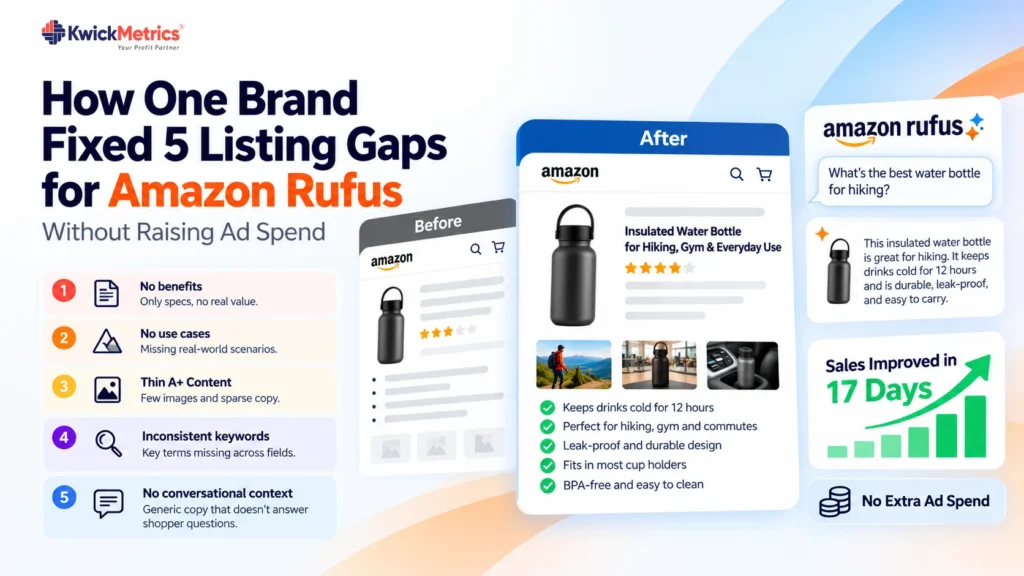
Table of Contents
Key takeaways
- Steady ad traffic wasn’t converting because the listing had content gaps — not because the campaigns were wrong.
- A listing audit surfaced 5 fixable problems: missing benefits, no use cases, thin A+ Content, inconsistent keywords, and no conversational context for Amazon’s AI assistant.
- Sales improved within 17 days of fixing the listing. Ad budget and bids stayed the same.
The listing was the bottleneck, not the ads
This established Amazon brand had a familiar problem. Sponsored Ads brought steady clicks, but the Amazon conversion rate wouldn’t move. The gap between traffic and orders kept widening, so the team kept raising the budget. More spend, same revenue.
The campaigns weren’t broken. Keywords were researched. Bids were competitive. The issue was what happened after the click — the listing itself. Shoppers landed, scanned the bullets, and left. Meanwhile, Amazon Rufus had little useful content to draw from when matching products to shopper questions.
The team stopped tweaking campaigns and turned to the listing.
What the audit found
The brand ran its listing through KwickMetrics’ Listing Analyzer, which checks the title, bullets, description, A+ Content, and keyword placement, then rates each factor as Good, Fair, or Poor.
Five gaps stood out:
- No benefits — only specs. The bullets described the product but never told the shopper what it actually does for them. Features without benefits don’t close sales.
- No real-world use cases. Shoppers ask Rufus questions like “what’s the best bottle for hiking?” or “which mat works on carpet?” Without scenarios in the listing, the AI assistant has nothing to match those queries to.
- Thin A+ Content. The A+ section had a few images and sparse copy — not enough to reinforce the value proposition or answer the questions shoppers didn’t think to ask.
- Inconsistent keyword placement. Key terms appeared in the title but were missing from the bullets and A+ Content. The Keyword Researcher confirmed the gaps. Finding the right terms is half the work. Placing them across every field is the other half.
- No conversational context. Amazon’s AI assistant reads listings for meaning, not just exact-match keywords. The copy was short, generic, and lacked the plain, benefit-led language that answers the way shoppers actually talk.
What changed on the listing
The brand worked through the audit one factor at a time and left the ad campaigns untouched.
| Listing element | Before | After |
|---|---|---|
| Title | Led with product specs | Leads with the primary use case |
| Bullets | Feature lists with no context | Built around buyer intent and real scenarios |
| A+ Content | Sparse copy, few visuals | Rebuilt with benefit-led copy and richer visuals |
| Keywords | Present in title, missing elsewhere | Placed consistently across every field |
| Overall copy | Short and generic | Rewritten with the Listing Optimizer in plain, descriptive language |
No broad rewrites. No redesign. Just targeted fixes to the five weakest points.
The results: sales improved in 17 days
The brand changed no budgets, no bids, and no campaign structure. Only the listing changed.
Within 17 days, sales improved and the same ad spend converted at a higher rate. Traffic stayed steady — the extra orders came from the listing doing a better job of selling shoppers who were already there.
The AI assistant likely played a role. A listing built around clear use cases and benefit-led copy gives Rufus more to work with when matching products to shopper questions. Amazon doesn’t publish recommendation data for it, so the brand can’t isolate that share of the lift. What it can show is that a stronger listing converted more of the traffic it was already paying for.
Why listing content matters more with Rufus
Amazon Rufus works by reading your listing and matching its content to conversational shopper queries. A listing with no use cases, thin copy, and sparse A+ Content gives it almost nothing to use. Sponsored Ads can bring the click, but the listing has to close the sale — for both the human shopper and the AI assistant surfacing your product.
If your listing scores well on keywords but poorly on context, you’re leaving conversions on the table.
Not sure which part of your listing needs work first?
Run it through the Listing Analyzer and start with the lowest-rated factor.
Get Your Questions Answered (FAQ)
Rufus is Amazon's conversational shopping assistant. Shoppers ask it questions — "what's a good gift for a runner?" — and it suggests products drawn from listing content. Clear use cases and benefit-led copy give your product more surface area to be matched on. It doesn't replace ads, but a thin listing limits what it can recommend.
Audit before you rewrite. Check each element — title, bullets, A+ Content, keywords — and fix the weakest first. Adding real-world use cases to the title and bullets is often the quickest win. Track your Amazon conversion rate for two weeks after each change so you can isolate what moved the needle.
Write for the questions shoppers ask, not just for keyword strings. Add benefit-led copy, name who the product is for, and describe the specific situations where it helps. Fill out your A+ Content fully and use the same key terms in every field. Keyword density matters less than clear, contextual language.
Name the situation, the problem the product solves, and who it's for. For example: "keeps drinks cold for 12 hours — made for gym sessions, hiking, and long commutes." Concrete scenarios help shoppers decide and give the AI assistant clear context to match against.

Karthick Selvaraj is a Product Manager at KwickMetrics, where he leads the development of data-driven tools that help Amazon and Walmart sellers track profitability, optimize ads, and manage their business with greater clarity and control. He works closely with eCommerce brands, presents at industry events, and turns real seller pain points into intuitive product features.