How Automated Client Reporting Helps eCommerce Agencies Cut Client Churn by 20%
Table of Contents
- What is Automated Client Reporting for Amazon & Walmart Agencies?
- The Hidden Cost of Manual Reporting for Amazon & Walmart Agencies
- How Automated Client Reporting Reduces Churn by 20%: The Data Behind the Claim
- Essential Agency Performance Metrics to Track in Automated Client Reporting
- Your Automated Client Reporting Stack: Tools & Integrations
- Step-by-Step Playbook: Implementing Automated Client Reporting in Your Agency
- Common Mistakes to Avoid When Implementing Automated Client Reporting
- Turn Reporting from a Time Sink into a Retention Engine
- Get Your Questions Answered (FAQ)
TL;DR
Agencies lose clients due to poor reporting clarity. Automated reporting delivers real-time insights, improves trust, and helps reduce churn by up to 20%.
Most Amazon and Walmart agencies lose 8–12% of clients quarterly, not from poor performance, but from poor communication. Manual spreadsheets and delayed reports fail to show profit clearly, leaving clients frustrated and questioning your value.
Automated client reporting changes everything. It’s a strategic retention lever that saves time, increases transparency, and positions your agency as indispensable. In this blog, you’ll learn how automated reporting cuts churn by 20%, which metrics actually matter, and how to implement white label dashboards that keep clients loyal.
What is Automated Client Reporting for Amazon & Walmart Agencies?
Automated client reporting eliminates manual data exports and spreadsheet consolidation by connecting directly to Amazon Seller Central, Walmart Seller Center, advertising consoles, and other platforms. Data flows automatically into branded dashboards and scheduled reports, giving clients real-time visibility into performance without your team touching a single CSV file.
Traditional agency reporting looks like this: account managers spend 10–20 hours per client each month logging into multiple platforms, copying data into spreadsheets, formatting charts, and emailing static PDFs. By the time clients receive the report, the data is already 5–7 days outdated, and insights arrive too late to influence decisions. Worse, inconsistent KPI definitions across accounts create confusion, and human error in formulas reduces trust.
Automated client reporting replaces this manual work with continuous, actionable insights. Data aggregation, transformation, visualization, and distribution happen on a schedule you control—weekly summaries, monthly deep dives, or real-time dashboards clients can access anytime.
For Amazon and Walmart account management agencies, this shift is critical because Amazon and Walmart metrics like ACOS, TACOS, reimbursements, storage fees, Buy Box percentage. Demand specialized agency reporting tools that generic marketing platforms simply can’t handle.
White labeling is essential here. A white label dashboard lets your agency rebrand the reporting interface with your logo, colors, and custom domain, so clients perceive the analytics as proprietary to your service. This approach transforms your white label agency from a vendor to rent attention into a strategic partner owning the client relationship.

The Hidden Cost of Manual Reporting for Amazon & Walmart Agencies
Time drain is only the beginning. If your amazon management agency manages 20 clients and spends 15 hours per client monthly on reporting, that’s 300 hours, nearly two full-time employees doing nothing but data entry instead of strategy, optimization, or growth initiatives. At a billing rate of $50–$60 per hour, manual reporting costs your agency $180,000–$216,000 annually in labor alone, and that doesn’t account for opportunity cost or delayed insights.
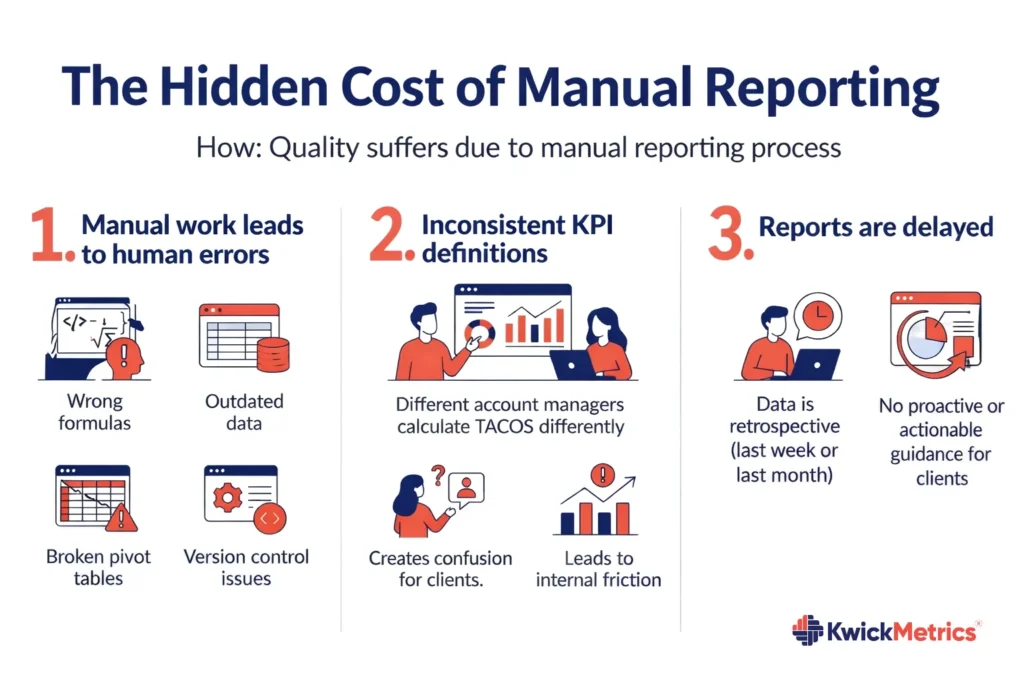
Quality suffers too. Manual processes lead to human error: wrong formulas, outdated data, broken pivot tables, version control nightmares. Inconsistent KPI definitions mean one account manager calculates TACOS differently than another, confusing clients and creating internal friction. When reports finally reach clients, the information is retrospective, it describes what happened last week or last month, but offers no proactive guidance.
Client experience is affected the most. Clients waiting days for performance updates get frustrated. Without regular visibility, they default to reactive questions: “Why did my ACOS spike?” “Where did my budget go?” “What am I paying you for?”. Meanwhile, competitors with automated client reporting deliver polished, co-branded ecommerce KPI dashboards that arrive like clockwork every Monday morning, making their agencies look proactive, professional, and indispensable.
The result? Industry baseline churn rates sit between 8–12% quarterly for agencies relying on manual workflows. Clients don’t leave because you’re doing bad work, they leave because you’re not communicating well enough to prove your value consistently.
How Automated Client Reporting Reduces Churn by 20%: The Data Behind the Claim
The connection between transparent communication and client retention is backed by real agency outcomes. When clients receive frequent, easy-to-understand reports automatically, their anxiety drops and perceived value increases. Automated reports keep your agency “top of mind” without requiring reactive outreach, and proactive alerts—inventory stockouts, ACOS spikes over threshold, profit margin drops, and prevent surprise bad months that trigger cancellation conversations.
Agencies implementing automated client reporting consistently report 30–35% productivity gains, with teams saving 100+ hours per month that redirect toward strategic calls, optimization, and upselling existing clients. Better yet, that saved time enables account managers to provide higher-touch service, strengthening relationships and making clients stickier.
Here’s the churn reduction math: a 30-client amazon seller agency with 10% quarterly churn loses 3 clients every quarter, representing roughly $15,000–$30,000 in lost monthly recurring revenue. After implementing automated reporting with white label dashboards and weekly updates, communication improves, issues surface faster, and clients feel more informed. Churn drops to 8%, losing 2.4 clients instead of 3, 20% churn reduction. Over four quarters, that difference compounds to $24,000–$48,000 in saved revenue per year, plus the compounding benefits of higher lifetime value, stronger referrals, and easier renewals.

Example 1: One mid-sized agency reduced annual churn from 18% to 7% after implementing AI-powered automated reporting and proactive retention workflows, protecting over $500,000 in recurring revenue. Another white-label e-commerce service agency scaled from 15 to 40 Amazon and Walmart accounts without adding reporting headcount, then won three enterprise contracts specifically because prospects cited “professional reporting infrastructure” as a differentiator.
Example 2: The ROI is clear: if setup costs $15,000–$40,000 and monthly platform fees run $4,000–$5,000 for enterprise solutions, agencies recover the investment within the first year through labor cost savings alone, before accounting for churn reduction and revenue expansion.
Essential Agency Performance Metrics to Track in Automated Client Reporting
Not all KPIs belong to your ecommerce KPI dashboard. Clients don’t need 50 metrics, they need 8–12 meaningful ecommerce performance metrics that directly connect actions to business outcomes. Overloading dashboards creates confusion; curating the right metrics builds trust and clarity.
Revenue and profitability metrics form the foundation. Track total sales and units sold for baseline performance, but go deeper with net profit per SKU. Calculated after Amazon fees, ad spend, COGS, storage fees, and reimbursements. Clients care most about money in their bank account, not surface-level numbers. Include ROAS (Return on Ad Spend) and TACOS (Total Advertising Cost of Sale) to show blended ad efficiency across Sponsored Products, Sponsored Brands, and Sponsored Display, and compare profit margins by channel when clients sell on both Amazon and Walmart.
Advertising and traffic metrics prove campaign effectiveness. ACOS at both campaign and account level shows spend efficiency, while impressions, clicks, CTR, and conversion rate reveal funnel health for Amazon PPC management. Don’t forget keyword rankings and organic share of voice, these demonstrate the long-term value of Amazon listing optimization efforts. Include ad spend tracking to flag budget burn rate against monthly targets before overspend surprises clients by mid-month.
Inventory and operations metrics prevent profit-killing surprises. Inventory, days of supply is the most important stockout risk indicator that flag anything under 7 days automatically. FBA storage fees and aged inventory costs drain margins silently, so surface these clearly. Track reimbursements claimed for lost or damaged inventory to show you’re recovering money Amazon owes and include stranded inventory alerts to catch listing health issues before they drop sales.
Listing and content performance completes the dashboard. Buy Box percentage measures competitive positioning, if it drops below 90%, clients need to know immediately. Conversion rate by ASIN reveals whether images, bullets, and A+ content are converting traffic effectively. Review velocity and average rating signal brand health, while suppressed listings and compliance flags from your Amazon listing optimization tool prevent content violations that kill visibility.
These metrics should update daily in your automated client reporting stack without anyone manually refreshing a single cell. Real-time data empowers real-time decisions, and clients notice the difference immediately.

Your Automated Client Reporting Stack: Tools & Integrations

Choosing the right agency reporting tool determines whether automation saves time or creates new headaches. Look for platforms with native integrations to Amazon Seller Central, Amazon Advertising, and Walmart Seller Center platforms your clients use. Multi-account management is not negotiable. Your tool should handle 10, 50, or 100+ accounts from one interface without breaking.
Most importantly, prioritize profit-first analytics over revenue-only dashboards. Your clients don’t just need to know total sales, they need SKU-level P&L with automated fee reconciliation, storage costs, COGS tracking, and reimbursements baked in. Generic marketing agency tools miss this entirely because they weren’t built for marketplace-specific complexities.
KwickMetrics powers automated client reporting specifically for Amazon and Walmart agencies managing multiple accounts. The platform consolidates profit & loss tracking, advertising performance, inventory health, listing optimization, and reimbursements into co-branded white label dashboards that clients access under your agency’s domain and branding. Automated report scheduling sends weekly summaries or monthly deep dives directly to client inboxes as branded PDFs, while real-time alerts notify account managers the moment inventory drops below safe thresholds, budgets overspend, ACOS spikes above target, or margins compress.
One 25-client amazon management agency using KwickMetrics saved 120+ hours monthly on reporting, shifted to weekly automated client updates, and increased retention from 88% to 92% in six months. That time savings redirected senior strategists from data entry to proactive optimization, upselling, and strategic planning. The high-value work that actually grows client accounts and justifies premium fees.
White label dashboard capabilities matter for white label agency positioning. Custom domains (reports.youragency.com), agency logos throughout the interface, custom email templates, and zero tool provider branding visible to clients make the analytics feel proprietary. Clients believe you’ve built sophisticated infrastructure, increasing perceived value and making it psychologically harder to leave.
Step-by-Step Playbook: Implementing Automated Client Reporting in Your Agency

Step 1: Audit your current reporting process. Map every data source from Amazon Seller Central, Amazon Ads, Walmart, spreadsheets, third-party tools and calculate time spent per client per month. Survey your internal team: which reporting tasks are most frustrating? Review client feedback: what reporting gaps or delays frustrate them most? This baseline quantifies the problem and builds internal buy-in for change.
Step 2: Define your standard ecommerce KPI dashboard. Pick 8–12 KPI ecommerce performance metrics every client will see, drawn from the Essential Metrics section earlier. Create tiered reporting: an executive summary with 3–5 KPIs for quick scanning, plus a detailed operational dashboard for deeper exploration. Standardize definitions, document exactly how you calculate “true TACOS” including all ad types, so every account manager speaks the same language. Decide which metrics appear in weekly summaries versus monthly deep dives.
Step 3: Choose and configure your agency reporting tool. Evaluate platforms against your checklist: integrations with Amazon seller software and Walmart, white label capabilities, profit tracking, proactive alerts, multi-account management. KwickMetrics checks every box for Amazon and Walmart agencies needing white label dashboards and profit-first analytics. Connect all client accounts via API, set up client grouping and internal tags, and configure account-level custom KPIs where needed.
Step 4: Build white label report templates. Design co-branded PDF and dashboard templates inside your agency reporting tool. Create a weekly summary template highlighting top 5 KPIs, key alerts, and quick wins. Build a monthly deep-dive template with full ecommerce performance analytics, trend charts, and strategic recommendations. Apply your agency logo, colors, and custom domain to the white label dashboard, then test templates with 2–3 pilot clients before full rollout to catch any UX issues early.
Step 5: Automate report scheduling and client communication. Schedule automated reporting for clients: weekly dashboards delivered every Monday morning, monthly PDFs sent the first Friday of each month. Set up proactive alerts for critical thresholds, inventory under 7 days, ACOS over 30%, profit drops exceeding 15%, and route these to the responsible account manager immediately. Train your team to review auto-generated reports, add 2–3 sentences of strategic commentary, then approve delivery. Create an internal SOP: “15-minute Monday report review ritual” before client-facing reports go out.
Step 6: Onboard clients to the new system. Send personalized intro emails explaining the upgraded automated client reporting system and its benefits: weekly updates automatically, real-time dashboard access anytime, proactive alerts before problems escalate. Host brief 15-minute walkthroughs showing clients how to log in to the white label dashboard, where to find key KPIs, and how to interpret alerts. Emphasize what’s in it for them, more transparency, faster insights, better communication, not just the technical features. Collect feedback after the first month to identify what’s working and what needs refinement.
Step 7: Measure impact and iterate. Track time saved per month by comparing pre-automation versus post-automation hours. Monitor client satisfaction through NPS scores, support ticket volume, and renewal rates. Most critically, measure churn reduction: compare quarterly churn rate before and after automated reporting rollout. Conduct quarterly reviews to optimize KPI selection, report frequency, and dashboard design based on client feedback and retention data. Most agencies see measurable churn reduction within 3–6 months, 20% improvement is realistic with consistent execution.
Common Mistakes to Avoid When Implementing Automated Client Reporting

Mistake 1: Over-automating without the human touch. Automated reports still need strategic commentary from account managers. Don’t “set and forget”, review every report before it reaches clients and add 2–3 sentences of insight: what’s working, what needs attention, recommended next steps. Automation handles data; humans provide context.
Mistake 2: Tracking too many metrics. Clients don’t need 50 KPIs, they need 8–12 meaningful ecommerce performance metrics. Separate executive dashboards (5 KPIs) from operational dashboards (full details). Use hierarchy: highlight what matters most, hide secondary metrics in expandable sections. Dashboard overload kills adoption.
Mistake 3: Ignoring white label branding. Generic dashboards with third-party logos undermine your white label agency positioning. Invest in white label dashboard setup: custom domain, logo, colors. Consistency across all client touchpoints strengthens your brand and improves retention. Clients who see your brand everywhere are less likely to shop around.
Mistake 4: Not training clients on the new system. Clients won’t use dashboards they don’t understand. Host onboarding calls, create short walkthrough videos, and offer ongoing support: “Reply to this email with any dashboard questions.” Low adoption signals wasted investment, make sure clients actually engage with the new reporting.
Mistake 5: Choosing the wrong tool for ecommerce needs. Generic marketing agency tools don’t handle Amazon seller tools data properly, they miss fees, reimbursements, and inventory complexities. Ensure your agency reporting tool supports multi-marketplace integrations (Amazon + Walmart) and delivers the profit-first analytics your clients actually need to make decisions.
Turn Reporting from a Time Sink into a Retention Engine
Manual reporting drains time, frustrates clients, and quietly drives churn for ecommerce agencies managing Amazon and Walmart sellers. Automated client reporting saves 100+ hours monthly, improves transparency, and strengthens the client relationships that protect your recurring revenue. White label dashboards and profit-focused ecommerce KPI dashboards position your amazon seller agency or white label ecommerce service agency as sophisticated, proactive, and indispensable.
The results speak clearly: 20% churn reduction is achievable within 3–6 months when you implement consistent, automated reporting backed by real-time alerts and strategic commentary. Agencies that master this shift win long-term contracts, command premium retainers, and scale client rosters without proportionally scaling headcount.
Automated reporting for clients isn’t optional anymore. It’s table stakes for competitive ecommerce marketing agencies. The difference between a 10% churn rate and an 8% churn rate represents millions of dollars in lifetime value over time.
Your next steps:
- Audit your current ecommerce reporting workflow and calculate time wasted on manual processes
- Explore specialized Amazon seller software and agency reporting tools like KwickMetrics designed for marketplace agencies
- Set up your first automated ecommerce KPI dashboard for 2–3 pilot clients and measure satisfaction
- Track time saved and client retention improvements after 60–90 days
The agencies protecting and growing, client lifetime value are the ones delivering proactive, profit-focused, beautifully branded analytics for agencies. Automated client reporting is how you build that retention engine and cut churn by 20%.
See How KwickMetrics Automates Client Reporting for Amazon & Walmart Agencies →
Get Your Questions Answered (FAQ)
Automatically pulling data from Amazon and Walmart marketplace into ready-to-share dashboards and reports, without manual exports or spreadsheets.
It delivers consistent, transparent reporting, so clients clearly see results and ROI, feel informed, and are less likely to leave.
They’re slow, error-prone, hard to read, and usually don’t show true profit, which makes clients question your value. Tools like KwickMetrics help simplify this by tracking product costs along with fees and ad spend in one unified dashboard.
Revenue, net profit per SKU, ACOS, TACOS, ROAS, ad spend, CTR, conversion rate, inventory days of cover, storage fees, and listing health.
A reporting portal branded with your agency’s logo, colors, and domain, so it looks like your own proprietary platform.
Yes. Automation handles data; account managers turn it into insights, recommendations, and strategy. Tools like KwickMetrics help simplify this by automatically bringing all these cost factors together in one place, making profit calculation more accurate and easier to manage.
Monthly performance deep-dive reports work best for most Amazon and Walmart clients. Tools like KwickMetrics make this easier by giving you clear product-level profit visibility in one place, so you can quickly identify which products are worth scaling and which need action.
Tools like KwickMetrics support Amazon/Walmart accounts, with per-client views and proper access control.
Roughly few minutes from setup and integrations to piloting with a few clients and finalizing templates.
Position it as an upgrade: more frequent, clearer, profit-focused reporting with live dashboard access, then walk them through it in a short call.
No. Smaller agencies gain leverage too—looking more enterprise-grade while freeing up limited team capacity.


Jyothishwari Mohanan is a Senior Content Strategist at KwickMetrics, where she crafts content that helps Amazon and Walmart sellers & agencies navigate the complexities of eCommerce with confidence. With 8+ years of experience across Retail and SaaS brands, she specializes in translating product capabilities into clear, compelling narratives that resonate with real sellers. She works closely with eCommerce teams, digs into seller challenges firsthand, and shapes content that drives both understanding and action.