
Listing Optimizer Tool

Amazon Listing Optimizer: Turn Clicks into Conversions

Write Better Listings, Publish Faster, Track What Changes 

Once you’ve captured attention, your listing must do the heavy lifting — and that’s where the KwickMetrics Listing Optimizer takes over. This smart Amazon listing optimization tool helps you craft content that ranks higher, reads better, and converts faster. 

Built for the Listing Smarter phase of the Amazon Seller Journey, this tool gives your product pages the polish they need to win trust and drive sales.

Listing Optimizer
Optimizing the List

Why Listing Optimization Isn’t Optional — It’s What Drives Conversions

Traffic without conversion is just wasted spend.

Sellers working to improve listing performance consistently run into the same problems:

Titles and bullets that don't use the right keywords

No way to optimise multiple similar products efficientl

No visibility into whether changes actually worked

Lack of direction on how to optimize Amazon listing content properly

The Listing Optimizer makes Amazon product listing optimization simple with structured templates, real-time suggestions, and direct publishing options.

Listing Optimizer

Common Challenges

These are the obstacles that hold sellers back from achieving optimal keyword performance

Optimising each product manually — slow, inconsistent, doesn't scale
Lack of structure across bullets and descriptions
Managing variant-heavy catalogs (size, colour, pack) without a consistent content framework
Disconnected keyword research and listing tools that require constant copy-pasting

How KwickMetrics Helps

A structured, end-to-end workflow for single products and entire catalogs — with performance tracking built in. 

With our AI Amazon listing optimization service, you get: 

Keyword-Driven Content Generation

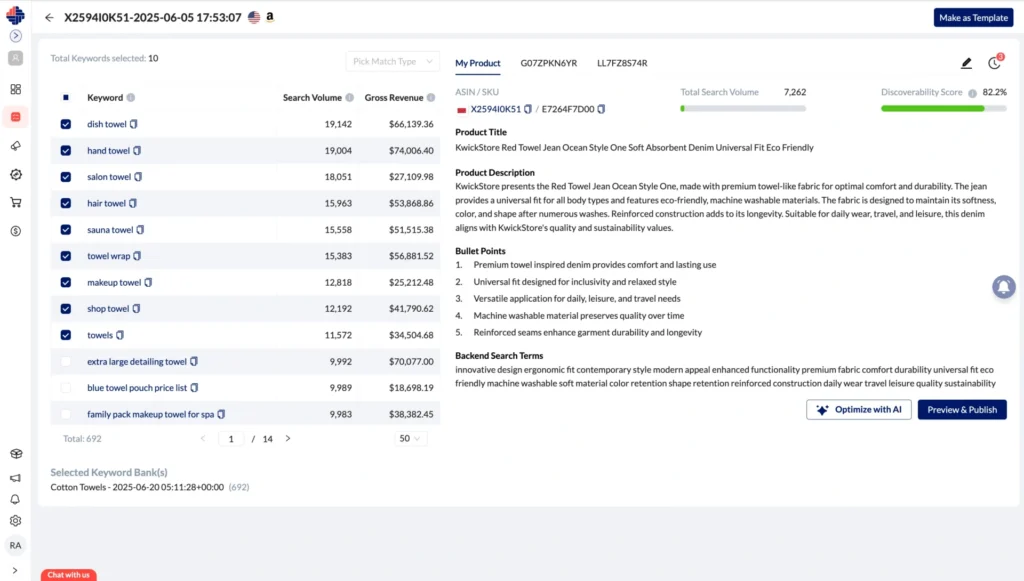
Use your Keyword Bank, product details, and competitor ASINs to generate optimized titles, bullets, descriptions, and backend terms.

Review, Edit, Then Publish

Edit any generated content, preview changes side by side, and publish only when ready.

Single Product Optimisation

Optimize one ASIN at a time with full control—ideal for launches, priority listings, or testing strategies.

Bulk Optimisation

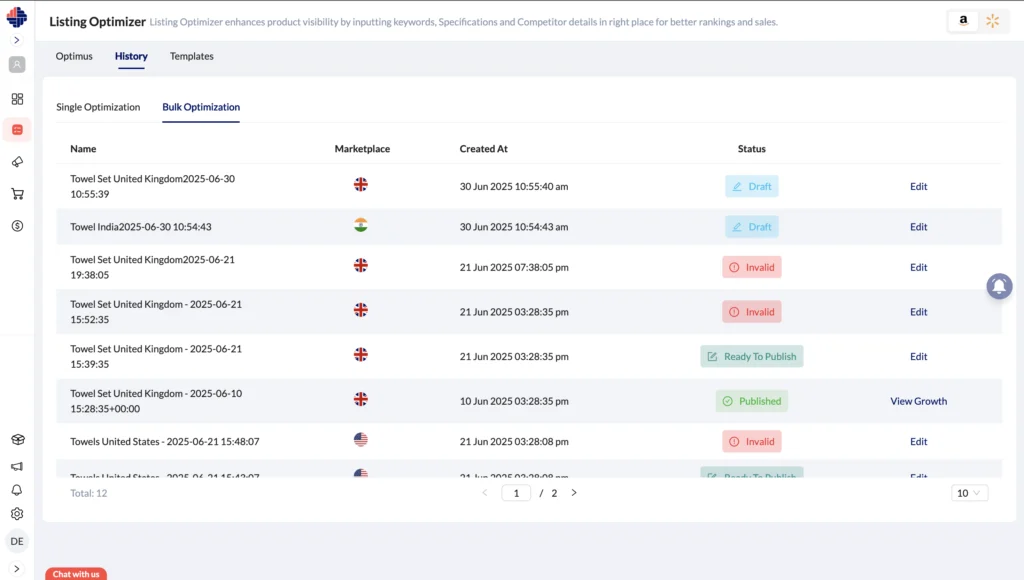
Create one template and apply it across multiple products or variants. Import, edit, and publish in one workflow.

Templates

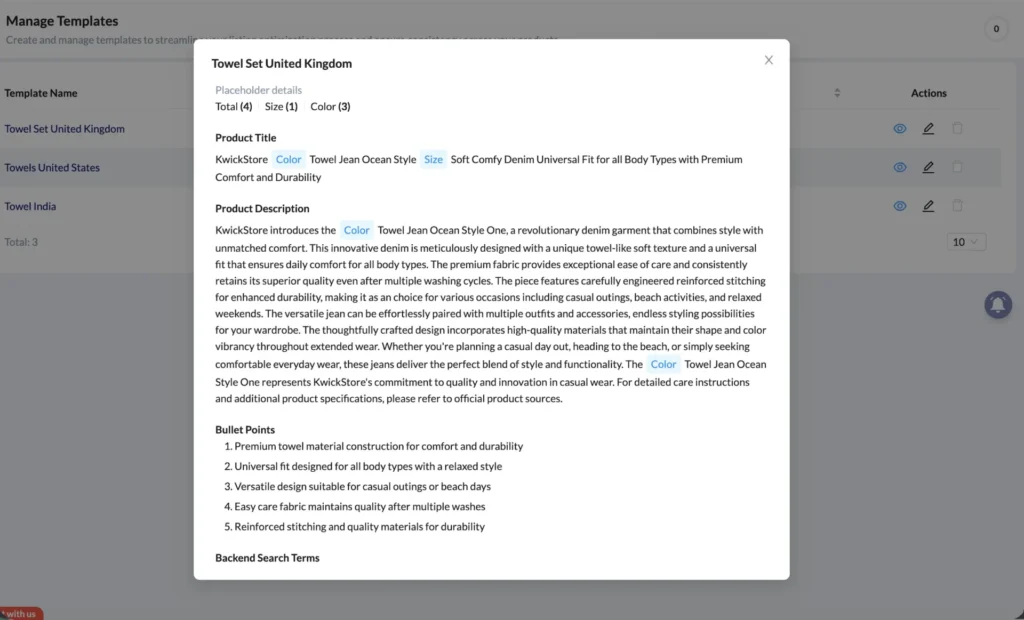
Save and reuse proven listing structures across your catalog for consistent, scalable optimisation.

Growth Monitor

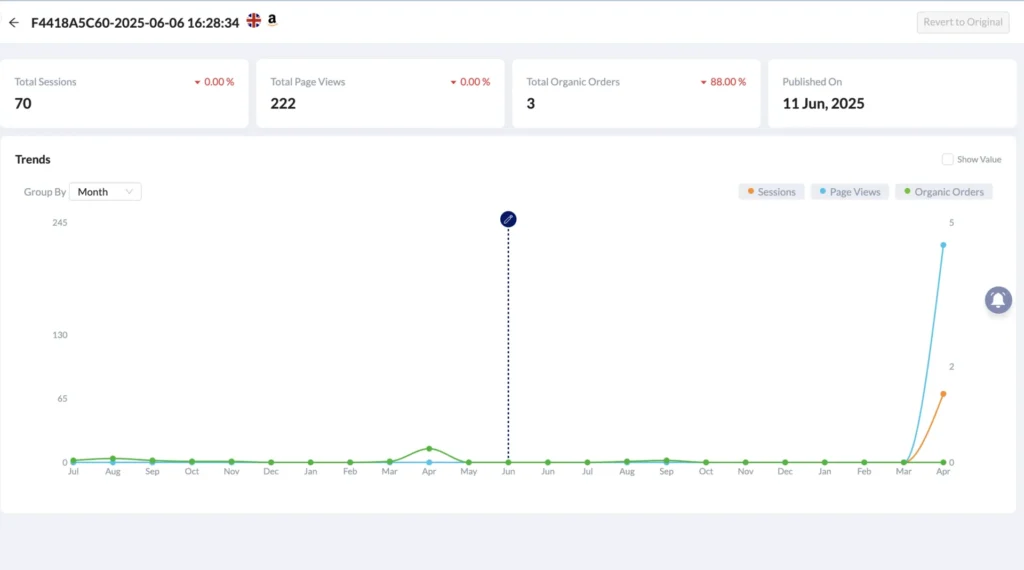
Track before-and-after performance—sessions, views, and orders—to measure real impact.

Revert to Original

Undo changes anytime and restore original content—optimize without risk. Experiment with confidence — no change is permanent unless you choose to keep it.

Session History

Access all past optimisation sessions, review results, and make updates anytime without needing to start over.

Listing Optimizer – Smarter Product Pages, Better Sales

Make your product listings stand out and sell more—without the guesswork. Here’s how our Listing Optimizer helps you fine-tune your listings with ease: 

Optimise One or Many Listings

Single Product Optimization: Select ASIN, SKU, and keywords (optionally add competitors). Generate, edit, and publish optimized content—ideal for launches or testing.

Bulk Optimization: Apply a template to multiple products. Add via ASIN/SKU or import, fill variant details, preview, and publish in one step.

One and Many Listings

See What’s Changed

Before & After Review: Compare original vs. optimized content side by side before publishing.

Optimisation History: All sessions are saved—review, track performance, or revert anytime.

Before vs After

Smart Suggestions That Work:

AI-Driven Recommendations: Get instant suggestions to improve your titles, descriptions, keywords, and more—based on what actually works on Amazon.

Smart Suggestions

Templates & Bulk Workflow:

Create Templates: Save a single optimized listing as a reusable template with variant placeholders.

Use in Bulk: Apply one template across multiple products for consistent, scalable optimisation.

Templates and Bulk workflow in Listing Optimizer

Track Performance:

Growth Monitor (Single): Track sessions, views, and orders vs. pre-optimisation baseline.

Growth Monitor (Bulk): View overall performance across products and drill into individual results. Revert if needed.

Track Performance of Growth Monitor

What You Can Do with this tool

Our Top Optimization Intelligence shows:

New Product Launch

Create a keyword-driven listing from scratch using your Keyword Bank and competitor inputs.

Fix Underperforming ASINs

Optimise a stagnant listing, publish changes, and track performance impact.

Scale Across Variants

Apply one high-quality template across all variants—consistent output, minimal effort.

Test Keyword Strategies

Experiment on a single ASIN, track results, and revert anytime—risk-free.

Agency / Multi-Brand Use

Manage multiple brands with templates and bulk workflows—no repeated setup.

Works Seamlessly With:

Enhance your Listing Optimizer with powerful integrations that streamline your workflow

 
Amazon Keyword Researcher →

Pull in keyword gaps found during competitor audits

Amazon Listing Analyzer →

Identify gaps between ranking and listing quality.

Amazon Listing Tracker →

Track listing quality and spot content gaps that need improvement.

Amazon Keyword Tracker →

Track keyword rankings and monitor position changes over time.

Outcomes

Higher Organic Visibility

Rank for more relevant searches with keyword-driven listings.

Stronger Conversion Rates

Optimised titles and bullets convert more of your existing traffic.

Faster Catalog Optimisation

Use templates and bulk workflows to scale listings quickly and consistently.

Confidence to Test & Iterate

Preview, track, and revert changes—optimize without risk.

Better Cross-Team Consistency

Standardised templates ensure consistent quality across products.

Measurable Impact

Track sessions, views, and orders with clear before-and-after data.

Smarter Listings

Ready to Start Listing Smarter?

Turn your product listings into conversion machines. Whether you're rewriting from scratch or refining what’s already there, the KwickMetrics Listing Optimizer makes it easy to create listings that rank and convert. 

No setup fees

Real customer insights

14-day free trial

Cancel anytime

Get Your Questions Answered (FAQ)

It streamlines Amazon listing optimization by guiding your content creation and publishing process in one place. 

Yes. You can rewrite and re-optimize existing listings with the latest data and best practices. 

This is a structured, AI-assisted tool with built-in keyword optimization and best-practice validation. It’s faster, smarter, and more effective. 

Absolutely. The tool ensures your hidden keywords are optimized for visibility.

Yes. While designed with Amazon in mind, Walmart content optimization is also supported.

No problem. This tool was built for you — with templates, prompts, and intelligent assistance throughout. 


Yes — this is the core of our self-serve Amazon listing optimization service, available to all trial and paid users.


Most sellers notice improvements in ranking and engagement within 1–2 weeks of optimizing their content. 


Ignite your Amazon journey by diving into these insightful articles!

Amazon Keyword Research Process: Complete SEO Guide
08Aug

Amazon Keyword Research Process: Complete SEO Guide

Reading Time: 4 minutesA comprehensive, targeted Amazon keyword list helps you optimize your product listings. Here are 3 ways to do Amazon SEO keyword research.

Best Practices for Amazon Images to Boost Your Sales
08Aug

Best Practices for Amazon Images to Boost Your Sales

Reading Time: 2 minutesAdhere to Amazon's image best practices for increased sales. Collaborate on brand image guidelines for compelling product…

Optimizing Amazon Keywords: Avoid These 7 Common Mistakes
08Aug

Optimizing Amazon Keywords: Avoid These 7 Common Mistakes

Reading Time: 6 minutesDiscover the importance of Amazon keywords and learn how to avoid the 7 common mistakes FBA sellers…

1 2 3 4