Keyword Researcher Tool
Amazon Keyword Researcher: Find the Exact Words Your Buyers Type
Stop guessing. Start ranking. Keywords backed by real Amazon search data.
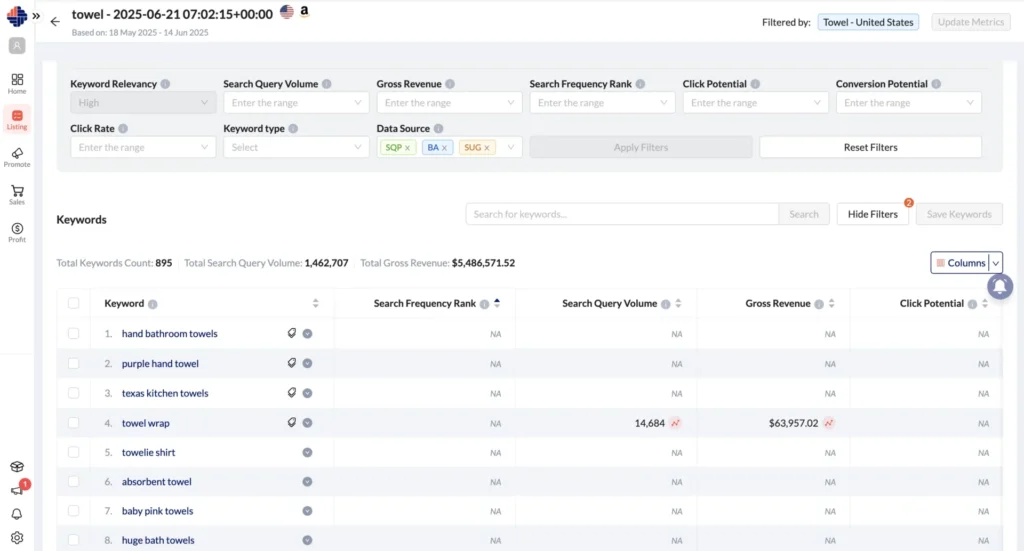
Your product is only as visible as the keywords behind it. The KwickMetrics Keyword Researcher pulls from multiple Amazon data sources — Brand Analytics, Search Query Performance, and Amazon Suggestions — to surface the keywords real shoppers use, filtered by demand, revenue potential, and competitive strength.
Whether you're launching a new product or refreshing a stale listing, this tool gives you the data to rank with confidence.
Keyword Research & SEO
Why Keyword Research isn’t Optional — It’s Essential
Your listing is only as strong as the keywords behind it.
If you're trying to improve your Amazon SEO or boost listing visibility, relying on gut feeling or guesswork won’t cut it. But too often, sellers fall into common traps:
Guess what keywords to use and miss real search traffic
Spend hours toggling between multiple keyword research platforms
Use generic terms that don’t convert
The Keyword Researcher solves all that with focused, data-backed keyword discovery built into your listing workflow.
Common Challenges
These are the obstacles that hold sellers back from achieving optimal keyword performance
Targeting keywords with no real buyer demand
Using broad terms that attract traffic but don't convert
Jumping between 3–4 disconnected tools to assemble keyword data
Missing high-revenue phrases competitors already rank for
Running ads on keywords dominated by listings you can't displace
How KwickMetrics Keyword Researcher Solves It
Built on multiple Amazon data sources. Works for every seller — with or without Brand Registry.
Real Buyer Search Terms from Amazon
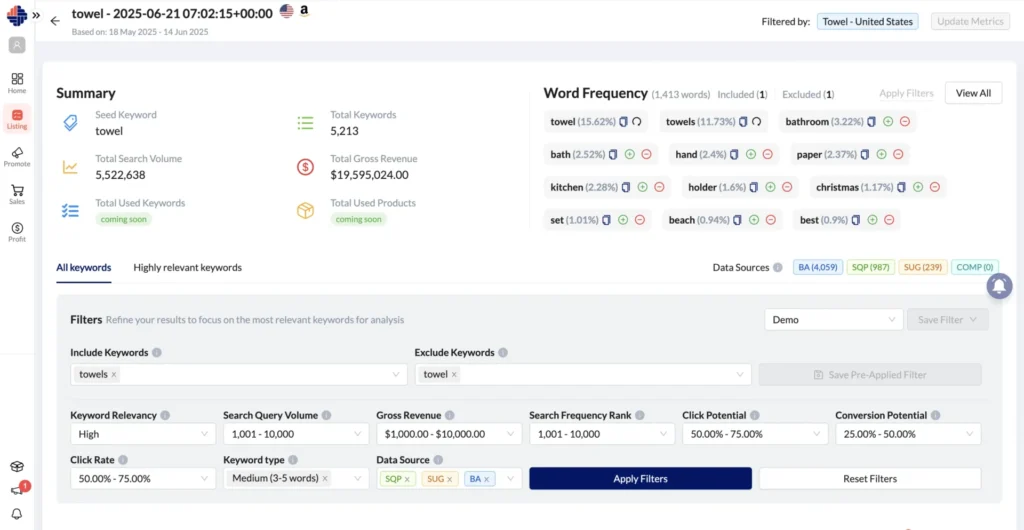
Discover keywords from Brand Analytics, Search Query Performance, and Amazon Suggestions. Enter a seed keyword, optionally pin it to a specific ASIN for tighter relevance, and get a focused list of terms real buyers type.
Search Frequency Rank (SFR)
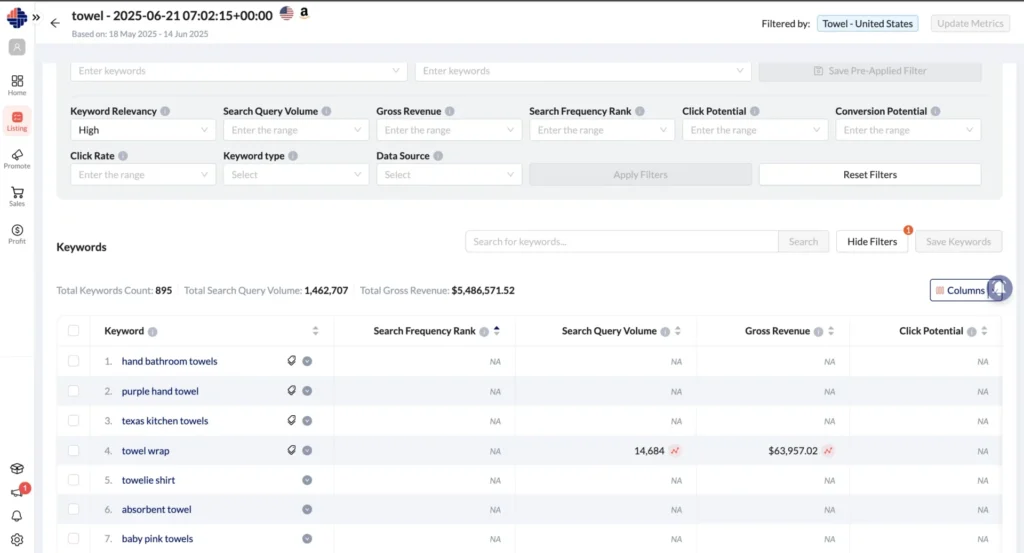
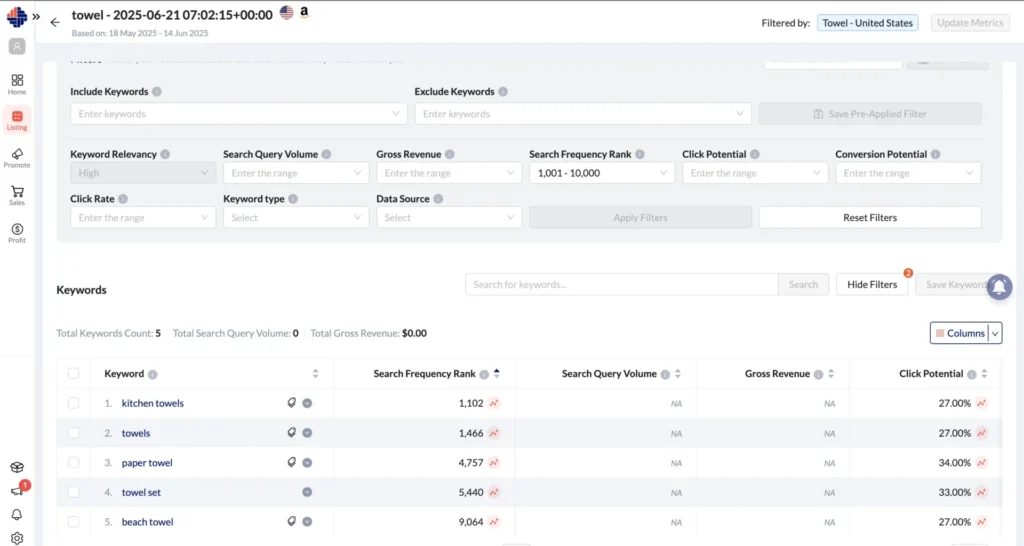
Every keyword includes its SFR from Brand Analytics. Lower rank = higher demand. Quickly identify which terms have the strongest buyer intent before committing to them.
Search Volume, Click Rate & Gross Revenue
For brand-registered sellers with SQP access: see the number of searches per period, the percentage resulting in clicks, and the estimated gross.
Click Potential & Conversion Potential
See how much traffic and how many sales the top-ranked products are capturing for each keyword — so you know whether a term is worth competing for before you invest in it.
Competitor Dominance — Up to 12 Competitors Per Keyword
For each keyword, the tool surfaces up to 12 competing ASINs based on buyer click behavior over a rolling 4-week window.
Works Without Brand Registry Too
SQP-based metrics require brand registration. If you're not registered, the tool still runs fully — using SFR, Amazon Suggestions, and competitor data.
Keyword Banks — Save, Organize, Reuse
Shortlist your best keywords and save them to Keyword Banks — persistent collections that carry all metric values from the time of saving. Reuse Keyword Banks inside Listing Optimizer when writing listings, and in Ads Campaigns
Session-Based Research — Revisit Any Search Anytime
Every keyword search runs as a trackable session. Sessions preserve your original results even as you apply filters or start new searches — compare across seed keywords and never lose previous work.
- Visual trends?
- See keyword and competitor performance mapped over the last 4 weeks via intuitive graphs.
Pick the Right Keywords with Easy Filters
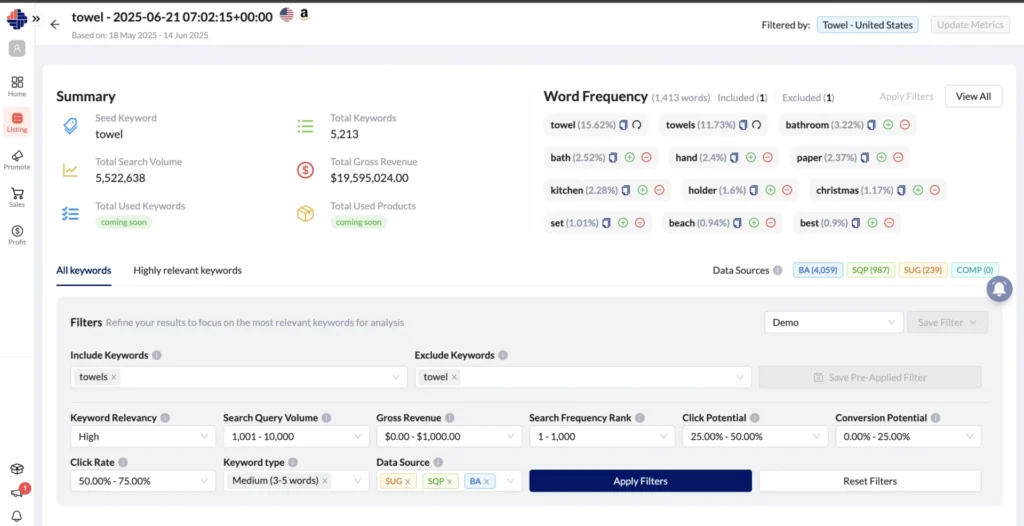
Don’t shift through noise. Use Advanced Filters to refine keyword lists based on:
Exclude Word Filter
Remove keywords that don’t match your product or audience by filtering out irrelevant words.
Keyword Type
Filter by short-tail (1 word), mid-tail (1–2 words), or long-tail (2+ words) to match your listing strategy.
Search Query Volume
Set a min/max range to target keywords with enough demand to matter, but not so broad that ranking is unrealistic.
Conversion Potential
Focus on keywords where the top competitors are already converting — buyers searching these terms are ready to buy.
Keyword Relevancy
Filter by High, Medium, or Low relevancy to surface only the terms most aligned with your specific product.
Search Frequency Rank (SFR)
Set an SFR range to stay within a specific demand band — filter out hyper-competitive mega-terms or low-traffic niche terms.
Data Source
Filter by where keywords originated — BA, SQP, SUG, or COMP — to focus your analysis by source type.
Pre-Applied Filters — Set Once, Apply Always
Save your preferred filter combinations and mark them as "Always Apply." They activate automatically for every new session — consistent qualification logic, zero manual reset.
Keyword & Competitor Intelligence
Uncover demand trends and outsmart your competition.
Understand Keyword Demand Over Time
See how click potential and conversion share have trended across the past 4 weeks. Time your listing updates and ad launches around real demand — not guesses.
See Who Dominates Each Keyword
The Competitors View inside your Keyword Bank shows the top ASINs buyers clicked, ranked by dominance. Review their listings, assess their click share, and decide: winnable keyword or one to avoid for now?
What You Can Do with this tool
Refreshing a Stale Listing
Find competitor keywords with high conversion potential and update listing + ads together
Launching a New Product
Build titles, bullets, and keywords using high-demand, low-competition terms before launch
Building Ad Campaign Keyword Lists
Save keywords to a bank and use them directly for ad campaigns
Identifying Winnable Competitive Gaps
Find mid-competition keywords where you can rank without a high ad budget
Works Seamlessly With:
Enhance your keyword research with powerful integrations that streamline your workflow
Amazon Listing Analyzer →
Identify gaps between ranking and listing quality.
Amazon Listing Optimizer →
Immediately apply improvements to keywords that are dropping.
Amazon Listing Tracker →
Track listing quality and spot content gaps that need improvement.
Amazon Keyword Tracker →
Track keyword rankings and monitor position changes over time.
Outcomes
30% Increase in Listing Visibility
Targeted, data-backed keywords make your products easier to find in search.
2x More Clicks on Product Listings
Relevant keywords drive qualified traffic and higher click-through rates (CTR).
Up to 25% Boost in Organic Sales
Rank for buyer-intent keywords that convert — without increasing ad spend.
50% Less Time Spent on Keyword Research
One tool, one search — no more jumping between platforms.
Competitive Insight Across Marketplaces
Discover what’s working globally and apply it locally.
Reusable Keyword Libraries
Keyword Banks compound over time. The more you research, the more your validated keyword library grows.
Smarter Listings
Ready to Start Listing Smarter?
Use real customer search behavior to fuel better listings. Start with smarter keywords and set your products up for success.
No setup fees
Real customer insights
14-day free trial
Cancel anytime
Get Your Questions Answered (FAQ)
KwickMetrics focuses on real-time Amazon SEO data tailored to your product and integrates keyword application directly into your listing tools.
We recommend reviewing performance and updating keywords monthly or when trends shift.
Absolutely. You get performance metrics from Search Query Performance reports (Amazon) to help refine and improve your keyword strategy.
We use real-time data from Amazon and Walmart, combining shopper behavior, search term trends, and historical performance.
Yes. We help you optimize both visible and backend keyword fields.
Yes! KwickMetrics supports keyword suggestions for both platforms, with Search Term tools for Amazon and Search Trend tools for Walmart.
Yes. The interface is designed for both beginners and advanced sellers, with curated suggestions and guidance built in.
You can import those keywords to KwickMetrics or use both tools in parallel. Our goal is to simplify your process and add insights.
Ignite your Amazon journey by diving into these insightful articles!
Amazon Keyword Research Process: Complete SEO Guide
Reading Time: 4 minutesA comprehensive, targeted Amazon keyword list helps you optimize your product listings. Here are 3 ways to do Amazon SEO keyword research.
Best Practices for Amazon Images to Boost Your Sales
Reading Time: 2 minutesAdhere to Amazon's image best practices for increased sales. Collaborate on brand image guidelines for compelling product…
Optimizing Amazon Keywords: Avoid These 7 Common Mistakes
Reading Time: 6 minutesDiscover the importance of Amazon keywords and learn how to avoid the 7 common mistakes FBA sellers…
Subscribe to Our Newsletter
Want to receive the latest Amazon and Walmart news, product updates, announcements, blog posts, tips and tricks? Enter your email below and get access to our newsletter!